THE GHOST PREMIERTEAM APP
A custom-built platform designed specifically for Ghost Premier travel softball. Manage rosters, payments, schedules, training, and communication—all in one place.
See It In Action
Real screenshots from the Ghost Premier iOS app.
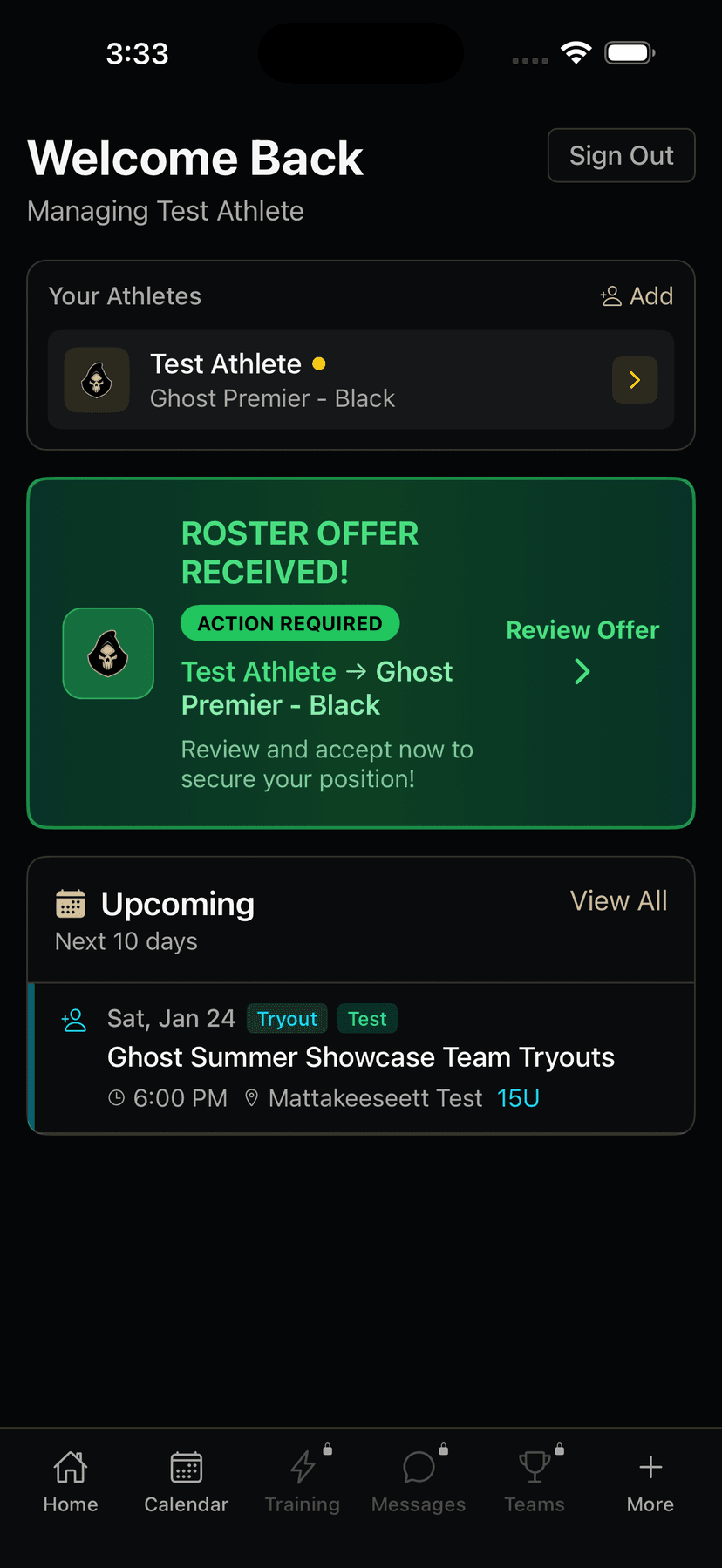
Home screen with roster offers, upcoming events, and quick access to all features
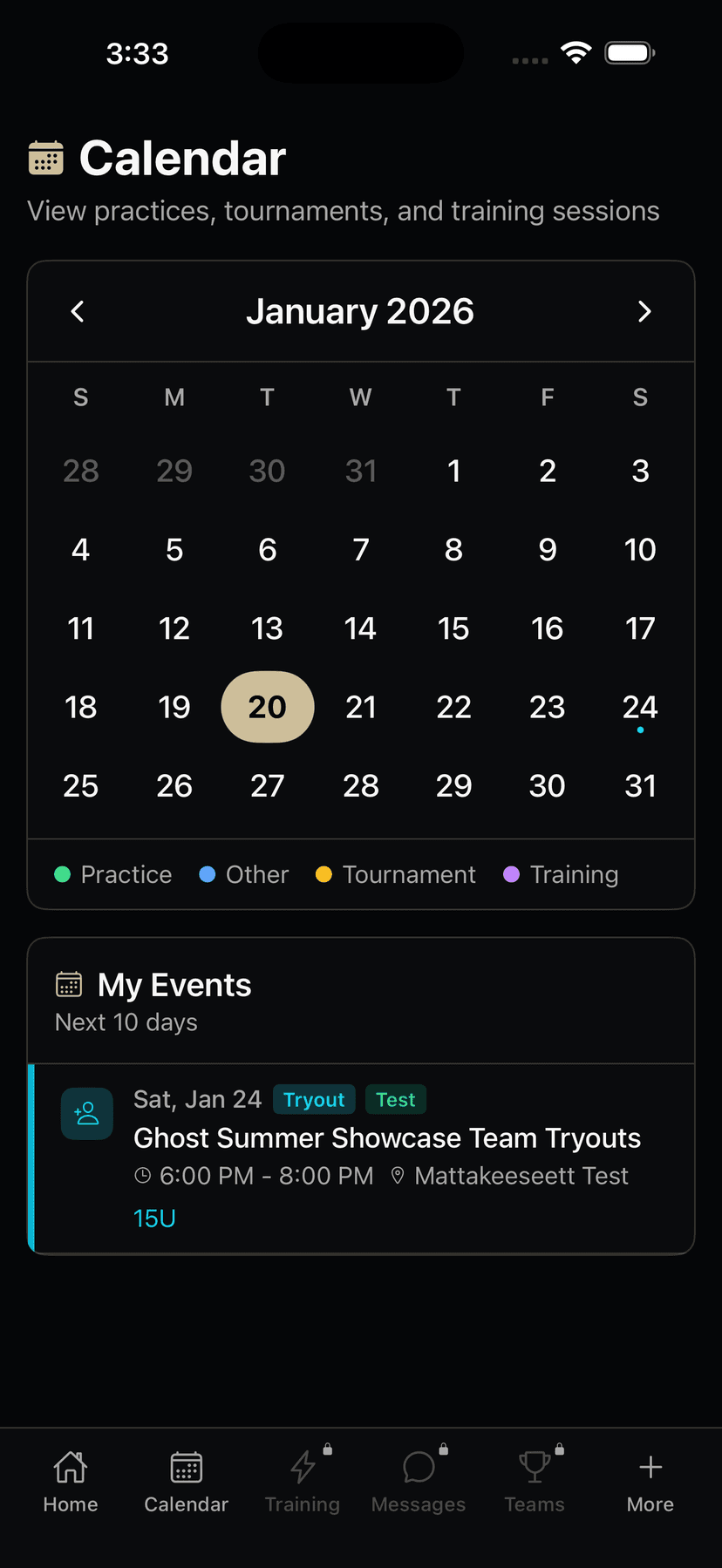
Calendar view with practices, tournaments, and training sessions at a glance
Available Everywhere
Access your account from any device, anytime.
Web App
Full-featured web application accessible from any browser on desktop or mobile.
- Complete dashboard access
- Full payment management
- Team rosters and schedules
- Message center
- Training bookings
iOS App
Native iPhone app with push notifications and on-the-go access to everything.
- Push notifications
- Quick schedule access
- Instant messaging
- Mobile payments
- Training bookings
Mobile Web
Responsive mobile experience in your browser. No download required.
- Works on any device
- Same features as desktop
- Bookmark for quick access
- No storage needed
- Always up-to-date
Built for Travel Softball
Every feature designed with travel softball families in mind.
Payment Management
Enterprise-grade payment processing with Stripe. Installment plans, auto-charge, early payment options, and complete transaction history.
Schedule & Calendar
Unified calendar for practices, games, tournaments, and training. Never miss an event with push notifications and reminders.
Team Messaging
Real-time communication between coaches, parents, and athletes. Team chats, direct messages, and broadcast announcements.
Push Notifications
Stay informed with instant notifications for payments, messages, schedule changes, and important announcements.
Training Bookings
Book training sessions at Atlantic Sports Performance. View availability, select time slots, and manage your bookings.
Secure & Private
Bank-level security with encrypted data, secure payments, and role-based access. Your family's information stays protected.
Role-Based Access
Different views for parents, athletes, and coaches—each tailored to their needs.
Parent Portal
Everything parents need to manage their athlete's travel softball experience.
Athlete Management
- View and edit athlete profiles
- Track positions, jersey numbers, and stats
- Manage multiple athletes per household
- Add emergency contacts and medical info
Team & Schedule
- View team rosters and coaches
- See upcoming practices, games, and tournaments
- Access tournament hotel blocks and travel info
- League schedule integration
Payments & Billing
- View payment schedule and installments
- Pay early or make partial payments
- Auto-charge with saved cards
- Download receipts and invoices
Communication
- Direct messaging with coaches
- Team announcements and bulletins
- Push notifications for important updates
- Unread message tracking
Athlete Portal
Athletes can track their own progress, schedules, and team information.
Personal Dashboard
- View team status and roster position
- Track personal schedule
- See upcoming events and practices
- Access team information
Communication
- Message coaches directly
- View team announcements
- Receive push notifications
- Stay connected with teammates
Coach Portal
Coaches manage their teams, communicate with families, and organize events.
Team Management
- View and manage team rosters
- Track player attendance and status
- See payment status per player
- Access guardian contact info
Scheduling
- Create and manage practices
- Schedule team events
- Set up recurring practices
- Manage tournament schedules
Communication
- Team-wide announcements
- Direct parent messaging
- Broadcast to multiple teams
- Push notification sending
Easy Onboarding
From offer to roster in a few simple steps.
Receive Offer
After tryouts, you'll receive an offer email with a link to accept your roster spot.
Accept & Pay Deposit
Click to accept the offer and pay your deposit to secure your spot on the team.
Complete Forms
Fill out required team forms including emergency contacts and medical information.
Jersey Preferences
Select jersey sizes and any customization options for your athlete.
Sign Waivers
Digitally sign required waivers and liability releases.
Setup Payments
Save a card for auto-charge or view your payment schedule for the season.
Frequently Asked Questions
Common questions about using the Ghost Premier app.
How do I access the app?
You can access the Ghost Premier app through our website at ghostsoftball.com/login, or download our iOS app from the App Store. Both provide full access to your account, schedules, payments, and messages.
How do I create an account?
Accounts are created when you register for tryouts or receive a team offer. You'll receive an email with login instructions. If you need help accessing your account, contact us through the prospect form.
Can I manage multiple athletes?
Yes! The app supports multiple athletes per household. You can switch between athletes from your dashboard and manage each one's schedule, payments, and team information separately.
How do payments work?
Season fees are split into installments with automatic due dates. You can save a card for auto-charge, pay early to get ahead, or make manual payments. All transactions are processed securely through Stripe.
Will I get notified about schedule changes?
Yes! Enable push notifications to receive instant alerts for schedule changes, new messages, payment reminders, and team announcements. You can customize which notifications you receive in settings.
How do I book training sessions?
Navigate to Training in your dashboard to view available sessions at Atlantic Sports Performance. Select a date, choose an available time slot, and confirm your booking. You can also cancel or reschedule from the same screen.
Can coaches see my payment information?
No. Coaches can only see whether payments are current or past due—they cannot see specific amounts, card details, or transaction history. Financial details are only visible to guardians and administrators.
How do I message my coach?
Go to Messages in your dashboard to start a direct conversation with your coach. You can also view team-wide announcements and chat messages from the same screen.
Is the app available for Android?
Currently, our native app is available for iOS (iPhone). Android users can access all features through our mobile-responsive web app at ghostsoftball.com—it works great in any mobile browser.
How do I update my contact information?
Go to Settings in your dashboard to update your email, phone number, and notification preferences. To update athlete information like positions or jersey number, go to your athlete's profile page.
READY TO GET STARTED?
Join Ghost Premier Softball and get access to our complete team management platform. Register for tryouts to begin the process.
The Ghost Premier app is a custom-built platform designed specifically for travel team management. Built with modern technology including Next.js, React, and Supabase, it provides a fast, secure, and reliable experience for all users.